n) New remote s) Set configuration password q) Quit config n/s/q>
1
2
3
4
n) New remote
s) Set configuration password
q) Quit config
n/s/q>
你輸入:n
代表「建立新的 remote」。
設定 remote 名稱
畫面問:
Enter name for new remote. name>
輸入:gdrive
意思是:你把這個 rclone 連線命名成 gdrive,之後所有操作都可以用 gdrive: 指向你的 Google Drive。
選擇儲存服務類型
畫面列出一大串支援的雲端,並問:
1
sudo apt install rclone -y
1
sudo apt install rclone -y
你輸入:18
代表選擇「Google Drive」。
client_id 與 client_secret
畫面問:
1 2
client_id> client_secret>
直接按 Enter 留空。
代表:
rclone 會使用官方內建的 Google OAuth client
好處是簡單
壞處是流量被限縮,不適合大量搬資料
不過你的用途是備份用,留空也可以正常運作
scope 權限設定
畫面問:
1 2 3 4 5 6 7 8 9 10 11 12 13 14 15 16 17 18 19
Option scope. Scope that rclone should use when requesting access from drive. Choose a number from below, or type in your own value. Press Enter to leave empty. 1 / Full access all files, excluding Application Data Folder. \ (drive) 2 / Read-only access to file metadata and file contents. \ (drive.readonly) / Access to files created by rclone only. 3 | These are visible in the drive website. | File authorization is revoked when the user deauthorizes the app. \ (drive.file) / Allows read and write access to the Application Data folder. 4 | This is not visible in the drive website. \ (drive.appfolder) / Allows read-only access to file metadata but 5 | does not allow any access to read or download file content. \ (drive.metadata.readonly) scope> 1
1 2 3 4 5 6 7 8 9 10 11 12 13 14 15 16 17 18 19
Option scope.
Scope that rclone should use when requesting access from drive.
Choose a number from below, or type in your own value.
Press Enter to leave empty.
 1 / Full access all files, excluding Application Data Folder.
   \ (drive)
 2 / Read-only access to file metadata and file contents.
   \ (drive.readonly)
   / Access to files created by rclone only.
 3 | These are visible in the drive website.
   | File authorization is revoked when the user deauthorizes the app.
   \ (drive.file)
   / Allows read and write access to the Application Data folder.
 4 | This is not visible in the drive website.
   \ (drive.appfolder)
   / Allows read-only access to file metadata but
 5 | does not allow any access to read or download file content.
   \ (drive.metadata.readonly)
scope> 1
輸入:1
代表使用:
1
Full access all files, excluding Application Data Folder.
意思是: rclone 可以對你的 Google Drive 執行讀寫與管理檔案,這是最完整的權限。
service_account_file
畫面問:service_account_file>
直接按Enter。代表你不用 Service Account,也不需要 JSON 憑證,而是使用一般 OAuth 流程登入。
advanced config
畫面問:Edit advanced config? y/n>
你輸入:n
代表採用預設值,不進階調整。
是否使用 auto-config
畫面問:Use auto config? y/n>
你輸入:n
原因:你是在沒有 GUI 的遠端主機上操作,所以不能自動跳出瀏覽器登入。
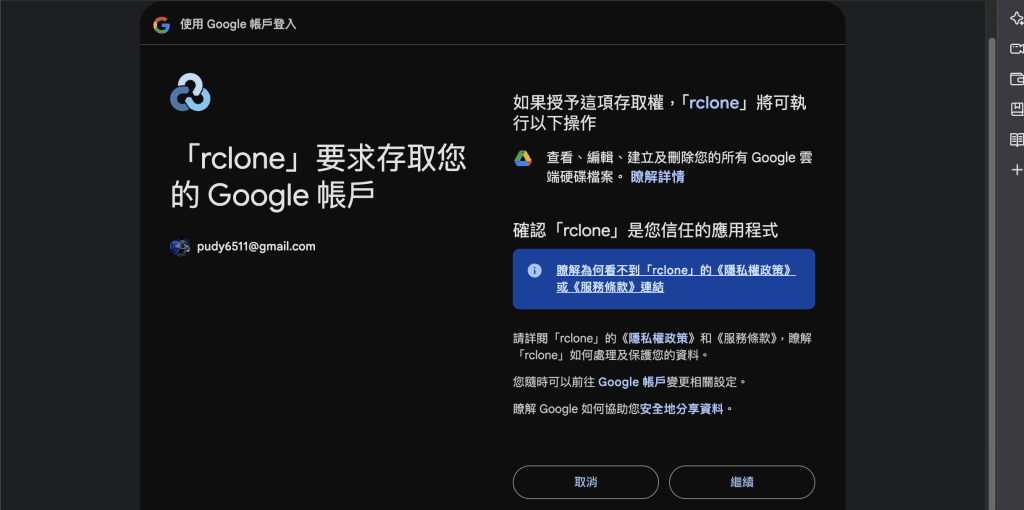
手動給 token (你的瀏覽器機器產出的)
1
2
3
4
5
6
7
8
9
10
Option config_token.
For this to work, you will need rclone available on a machine that has
a web browser available.
For more help and alternate methods see: https://rclone.org/remote_setup/
Execute the following on the machine with the web browser (same rclone
version recommended):
        rclone authorize "drive" "授權碼"
Then paste the result.
Enter a value.
config_token>
1
2
3
4
5
6
7
8
9
10
Option config_token.
For this to work, you will need rclone available on a machine that has
a web browser available.
For more help and alternate methods see: https://rclone.org/remote_setup/
Execute the following on the machine with the web browser (same rclone
version recommended):
        rclone authorize "drive" "授權碼"
Then paste the result.
Enter a value.
config_token>
畫面問:config_token>
在任何有瀏覽器的電腦開 Terminal
輸入:
1
rclone authorize "drive" "<授權碼>"
1
rclone authorize "drive" "<授權碼>"
這一步代表:你透過另一台有網頁瀏覽器的機器完成 Google OAuth 登入,再把結果回傳到伺服器。
Shared Drive 是否要設定
畫面問:Configure this as a Shared Drive? y/n>
你輸入:y
代表問 Google Drive 是否有 Team Drive。 你沒有 Team Drive,所以顯示:No Shared Drives found
完成設定並儲存
最後 rclone 問:Keep this “gdrive” remote?
你輸入:y
設定就正式完成。
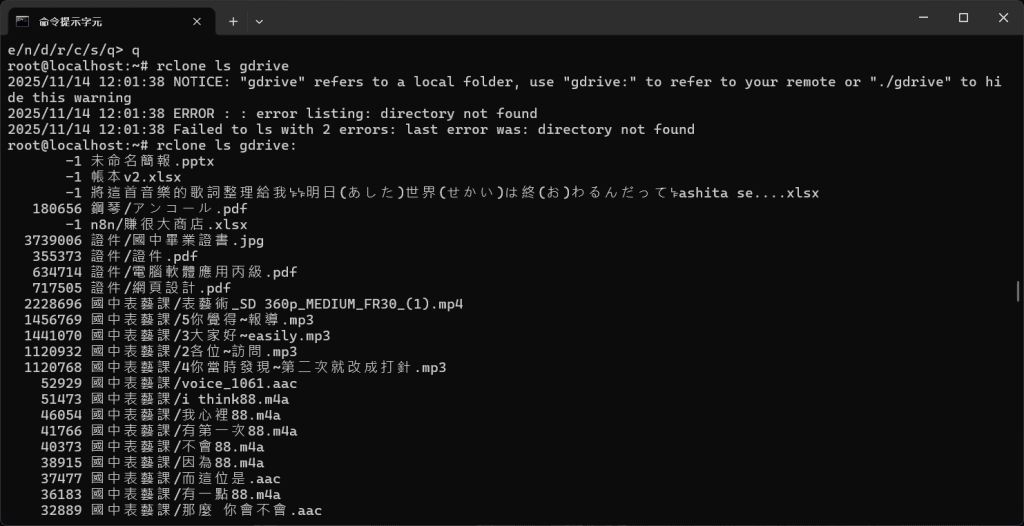
測試 remote 是否正常
你輸入:
1
rclone ls gdrive:
1
rclone ls gdrive:
重點是要加冒號。執行後,你看到 Google Drive 裡全部的檔案列表。代表 gdrive remote 設定成功。